Theory meets freeplay.
Music theory comes to Play mode. Pick a key, play freely, read the staff, and the app names every chord — without interrupting a note.

Key reference
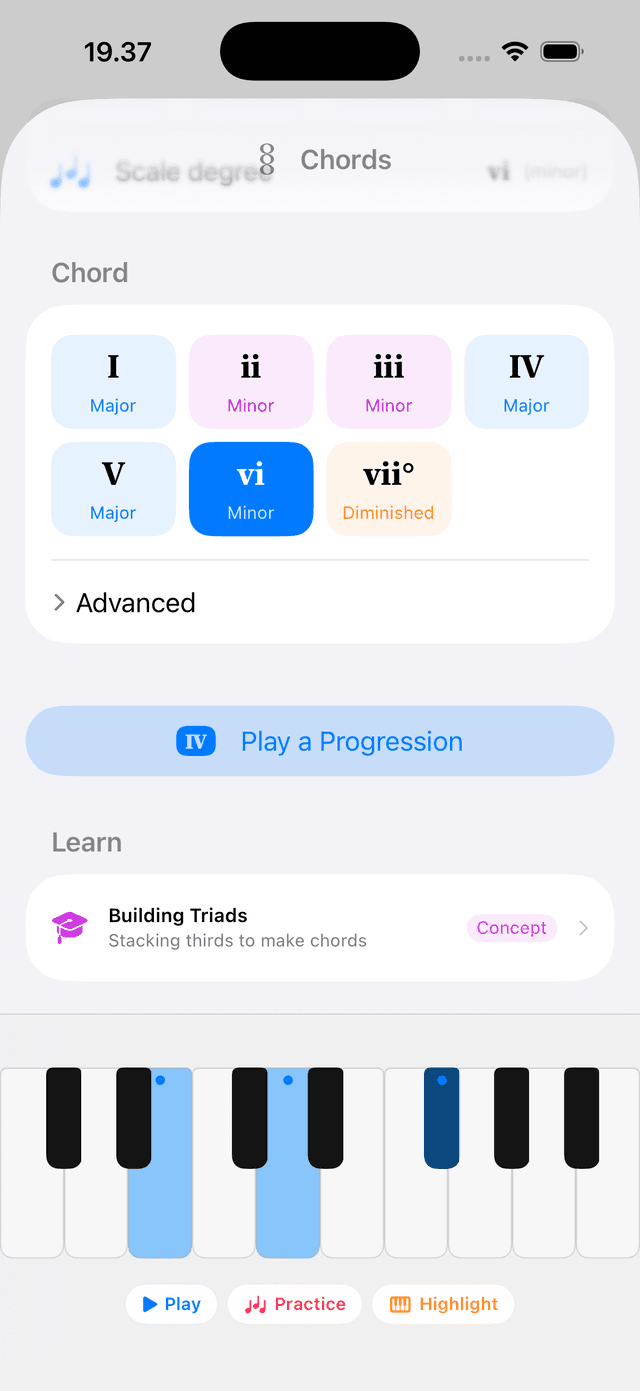
Any key. Live on the keys.
Pick a root and mode from a card-style selector. The keyboard immediately highlights that key's scale and a strip below names every diatonic chord — I through VII — so the whole harmonic palette is visible as you play. Change key, everything updates instantly.
Play & Theory deep dive →
Chord names
Hold a chord. The app names it.
The display above the keyboard detects and names the chord you're holding in real time — including slash chords. Play a G over a C bass and it reads C/G. No lookup, no interruption.
Staff play-along
Play what you see. Watch it turn green.
The Play grand staff now uses real music engraving — stems flip by register, chords stack into one column, ledger lines always appear. Set a key and gray ghost notes show what to play next. Hit each note and it turns green with a sparkle. Wrong notes appear at the cursor and fade out.
The play mode shapes what you see: Block stacks chords into columns, Arpeggio Up spells them note by note, and Alberti Bass draws the bass pattern. The staff ghosts follow whatever you pick.

Play along
Load a progression. Play over it.
Open any saved chord progression directly in Play mode. The app steps through chords automatically — one at a time, at whatever pace you set — so you can focus on playing rather than switching. Hear how your improvisation sits against each chord without stopping the flow.
Play & Theory deep dive →Follow Key. Sharps. Flats.
A single setting controls how notes are spelled everywhere — chord names, inversions, and lesson labels. Follow Key spells notes as the current key dictates. Sharps and Flats override globally. Set it once, the whole app adjusts.
For early users
A thank-you for being here early.
If you had Tiny Instrument before 2.2, the full content library is yours — instruments, packs, and all future content. No unlock needed. It's a small thank-you for choosing the app when it was just getting started.
Performance
Faster where it matters most.
~500×
faster chord detection — 10.4 ms per call drops to 0.02 ms on cache hit, off the main thread
0 hangs
chord explorer and key reference previously blocked the main thread up to 14 times per session
Instant
chord strip — diatonic triads precomputed off-main, ready before you open Play
Compose
Progressions: inversions, slash chords, and the Play strip.
Chord inversions
Each chord now has the same ◀ ▶ inversion stepper as Play mode. Inversions carry through to chord strip labels, keyboard highlights, audition, full playback, and Chase-the-Notes practice.
Slash chord bass
Add a foreign bass to any chord — C/D, G/E♭. Pick from the Bass row; chord-tone basses route to the inversion stepper automatically. The bass carries into Play-mode loading and Chase-the-Notes.
Play strip in Compose
The progression editor now embeds the shared Play chord strip: audition a chord, step inversions, and play the whole progression. Playback is cancellable; voice settings persist per chord.
Also in 2.2
- Free Songbook lesson chapter — turning a chord chart into real practice, available to everyone at no cost
- Scale degrees and fingering in Play highlights — hand-split colors when both hands are active
- Sparkle effects in Scale, Chord, Progression, MIDI, and Songbook practice — Effects settings moved to General
- Sticky keyboard dock — Play mode rebuilt to keep the keyboard pinned at the bottom across all orientations
- Collapsible Play dock — chevron collapses the guide panel and chord strip, growing the keyboard
- In-app 'What's New' sheet — illustrated swipeable walkthrough shown once after each update, and from Settings → About
- Mode settings reorganized as a per-mode drilldown — Play, Practice, Learn, Listen, and Compose each get their own panel
- Lesson tagging and topic lookup — filter lessons by concept or search by topic name in Aria
- iPhone chord-progression picker — opens the full saved + template list before setup
- Confirm before abandoning practice; reconfigure play mode, BPM, and hand split mid-session
- Redesigned About screen — Metal ripple effect on tap, Reddit and support links
- Live Rewind enable/disable and stuck-note threshold configurable in Settings
- Bug fixes: Play staff no longer snaps to bottom; iPad rotation and layout fixed; advance-as-you-play works with high-voiced chords; chord highlight now includes the root; macOS Compose footer fixed; MIDI input listens to selected device only; high-octave crashes in Scales resolved
Tiny Instrument 2.2
Free to download.
Play with theory, name every chord, and set your own accidental spelling — all free. Unlock full lesson chapters and practice tools with content packs.